StarDesk review: Remote play and workstation access on Android
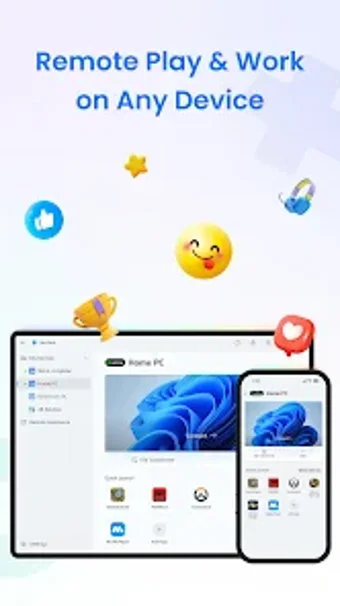
StarDesk from GearUP Global is an Android remote desktop app that lets phones and tablets control desktop workstations. It streams a host display to mobile devices for interactive use, aimed at latency-sensitive tasks such as gaming and professional creative work. The app emphasizes preserved visual fidelity and responsive input alongside tools for mobile access to powerful hosts. It targets gamers, creative professionals, and remote workers who need desktop-grade responsiveness away from their desks.
What devices and connections does StarDesk support, and how simple is setup?
StarDesk links mobile and desktop environments across Android, iOS, Windows, and Mac, supporting both mobile-to-PC and PC-to-PC connections. Setup avoids complex network steps like port forwarding, which reduces configuration friction. The app also supports Remote Wake-on-LAN, so users can turn on a sleeping host from their device. These elements make initial pairing and remote availability practical for on-the-go use.
How suitable is StarDesk for remote gaming and controller mapping?
The app targets high-refresh-rate gameplay with a dedicated Remote Gaming mode that exposes customizable keyboard mappings and gamepad support for mobile controllers. It is optimized to present fast, high-frame streams to the client, and the input mapping tools help translate desktop controls to touch and controllers. This arrangement serves weekend players and competitive mobile gamers who want closer-to-local responsiveness.
Is StarDesk a good fit for designers and color-critical tasks?
StarDesk includes display features aimed at professional work, such as true-color HDR and a 4:4:4 mode intended for precise color reproduction, plus multi-screen management for controlling multiple monitors remotely. It also provides high-speed, unlimited file transfers so large design assets or CAD files can move between host and device without artificial size limits, which supports studio workflows on the go.
What privacy, security, and provenance should users expect?
Security and a privacy option are built into remote sessions: transmissions use end-to-end encryption and a privacy mode that blacks out the host monitor while someone connects. The app is developed by GearUP Global, a studio known for high-performance network utilities and related tools. That background aligns with the app's focus on low-latency network performance and practical connectivity features.
To sum up, who benefits most from StarDesk?
To sum up, StarDesk is a practical option for mobile gamers and creative professionals who need responsive remote access, and user feedback highlights its strong latency performance and approachable setup. One practical consideration is that system requirements vary by Android device, so confirm your hardware can handle high-resolution, high-frame-rate streams before you depend on it daily. With that check, it fits users seeking near-local desktop access on mobile.
Pros
Low input lag during remote sessions, supporting responsive gameplay
Customizable keyboard mappings and gamepad support for mobile controllers
End-to-end encryption plus a monitor-blackout privacy mode
High-speed, unlimited file transfers between host and device
Cons
High visual settings demand capable Android hardware; requirements vary
Color-accurate modes may need matched host and client configuration
Advanced controller setups can require extra mapping effort
Loading…
About permissions
Before downloading, you can take a quick look at the permissions this app may request on your device. App permissions allow certain features to work properly, such as accessing your camera to take photos, your location for maps, or your storage to save files.
In this section, you’ll find a clear and simple overview of the types of permissions the app uses, grouped by their level of sensitivity, along with a visual breakdown to help you understand them at a glance. This way, you can see how the app interacts with your device and decide to download with confidence.
Permissions types
Standard
38%
Non-standard
13%
Sensitive
50%
Permissions distribution
Privacy
50%
Data collected
31%
Data shared
19%
Data safety info
Privacy
8 permissions
Permissions that allow the app to access personal or sensitive information stored on your device, such as location, contacts, camera, or microphone.
android.permission.VIBRATE
Standard
android.permission.WAKE_LOCK
Standard
android.permission.SYSTEM_ALERT_WINDOW
Non-standard
android.permission.USE_FINGERPRINT
Sensitive
android.permission.USE_BIOMETRIC
Sensitive
android.permission.FOREGROUND_SERVICE
Standard
android.permission.FOREGROUND_SERVICE_SPECIAL_USE
Non-standard
android.permission.READ_PHONE_STATE
Sensitive
Data collected
5 permissions
Information the app may gather from your device or usage activity to enable features, personalize content, and improve overall performance.
android.permission.READ_EXTERNAL_STORAGE
Sensitive
android.permission.RECORD_AUDIO
Sensitive
android.permission.ACCESS_NETWORK_STATE
Standard
android.permission.ACCESS_WIFI_STATE
Standard
android.permission.CAMERA
Sensitive
Data shared
3 permissions
Information that may be shared with trusted third parties to provide services, support app functionality, or deliver relevant content.
android.permission.WRITE_EXTERNAL_STORAGE
Sensitive
android.permission.INTERNET
Standard
android.permission.POST_NOTIFICATIONS
Sensitive
This report summarises the permissions declared by the app at the time of scanning and groups them into Privacy, Data collected and Data shared. A declared permission shows what the app can access, it does not necessarily mean personal data is collected or transmitted. For full details check the app’s privacy policy and the developer’s clarifications shown below. Softonic generates this report automatically from the package metadata; it is informational and not a substitute for a full security or privacy audit.
Laws concerning the use of this software vary from country to country. We do not encourage or condone the use of this program if it is in violation of these laws. Softonic may receive a referral fee if you click or buy any of the products featured here.